---
title: "How to integrate Concordion in Play Framework and write acceptance tests in natural language"
date: 2013-07-05T08:32:54+00:00
author: "poornerd"
tags: ["bdd", "Concordion", "howto", "PlayFramework", "tdd", "Testing", "Unit Testing"]
canonical: https://www.poornerd.com/2013/07/05/how-to-integrate-concordion-in-play-framework-and-write-acceptance-tests-in-natural-language/
source: Raw Markdown twin of the HTML article; content is the original source.
---
[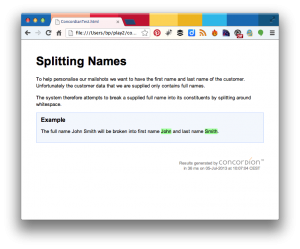 ](https://www.poornerd.com/wp-content/uploads/2013/07/Screen-Shot-2013-07-05-at-10.24.25.png)After starting to read “Specification by Example”, I wanted to have a go a writing acceptance tests for my Play Framework projects. I stumbled onto Concordion (http://www.concordion.org/), because it is similar to Cucumber but written in and for Java.
> Concordion is similar to Cucumber but focuses on readability.
Concordion integrates as Unit tests (which is the primary focus of this post), and lets you write the Tests in Natural Language in HTML Files so that it also becomes self documenting.
I got most of how to integrate Concordion from Craig Aspinall in Australia (@aspinall) who had written a Blog post about it, but which was no long “online”. (he sent me a link to the markdown so I could try it out – thank Craig!)
### Integrating Concordion
You first need to add the dependency to your `Build.scala`, and then add a line so that the SBT copies the Concordion HTML files:
](https://www.poornerd.com/wp-content/uploads/2013/07/Screen-Shot-2013-07-05-at-10.24.25.png)After starting to read “Specification by Example”, I wanted to have a go a writing acceptance tests for my Play Framework projects. I stumbled onto Concordion (http://www.concordion.org/), because it is similar to Cucumber but written in and for Java.
> Concordion is similar to Cucumber but focuses on readability.
Concordion integrates as Unit tests (which is the primary focus of this post), and lets you write the Tests in Natural Language in HTML Files so that it also becomes self documenting.
I got most of how to integrate Concordion from Craig Aspinall in Australia (@aspinall) who had written a Blog post about it, but which was no long “online”. (he sent me a link to the markdown so I could try it out – thank Craig!)
### Integrating Concordion
You first need to add the dependency to your `Build.scala`, and then add a line so that the SBT copies the Concordion HTML files:
import sbt._
import Keys._
import play.Project._

object ApplicationBuild extends Build {

    val appName         = "computer-database"
    val appVersion      = "1.0"

    val appDependencies = Seq(
       "org.concordion" % "concordion" % "1.4.2" % "test"  ,
      javaCore,
      javaJdbc,
      javaEbean
    )

    val main = play.Project(appName, appVersion, appDependencies).settings(
      // Next, you need to instruct SBT to copy the Concordion HTML files to the target folder
        unmanagedClasspath in Test <+= (baseDirectory) map { bd => Attributed.blank(bd / "test") }
    )
}
### Telling Play where to output the Test results to
This turned out to be a challenge. If you do not set the `concordion.output.dir` system property, then they are outputed to your Java temp directory. Craig suggested setting it in the `Build.scala`, but as it turns out the most recent Version of Play forks the Tests into a separate process and loses the setting. So I ended up adding this to my Global Settings class:
import play.Application;
import play.GlobalSettings;
public class Global extends GlobalSettings {

    public void onStart(play.Application arg0) {
        if (arg0.isTest())
            System.setProperty("concordion.output.dir", "target/test-reports/concordion");
    }

}
_Note: I think I discovered another Bug in Play, because although this works, if I run “test-only” it doesn’t!!!_
### The Test
The key to getting Play to recognize and run Unit Tests is the @Test annotation, so it seems that the easiest way to get Play to run the Concordion tests is to add a method like this to your Concordion fixture class:
@Test
    public void runThisTest() {
    }
I ended up implementing one of the tutorial examples from here: http://www.concordion.org/Tutorial.html
You write the test case in HTML, and use tags with Concordion elements to specify the paramters and assertions:
<html xmlns:concordion="http://www.concordion.org/2007/concordion">

    <head>
        <link href="../concordion.css" rel="stylesheet" type="text/css" />
    </head>

    <body>

        <h1>Splitting Names</h1>

        <p>
            To help personalise our mailshots we want to have the first name
            and last name of the customer. Unfortunately the customer data
            that we are supplied only contains full names.
        </p>

        <p>
            The system therefore attempts to break a supplied full name into
            its constituents by splitting around whitespace.
        </p>

        <div class="example">

            <h3>Example</h3>

            <p>
                The full name
                <span concordion:execute="#result = split(#TEXT)">John Smith</span>
                will be broken into first name
                <span concordion:assertEquals="#result.firstName">John</span>
                and last name
                <span concordion:assertEquals="#result.lastName">Smith</span>.
            </p>

        </div>
    </body>
</html>
Then you write a fixture class with the Tests (and the `@Test` “hack” I mentioned).
import org.junit.Test;
import play.mvc.Result;

import java.util.HashMap;
import java.util.Map;

import static org.fest.assertions.Assertions.assertThat;
import static play.test.Helpers.*;

import org.concordion.integration.junit4.ConcordionRunner;
import org.junit.runner.RunWith;
import org.junit.Test;

@RunWith(ConcordionRunner.class)
public class ConcordianTestFixture {

    public Result split(String fullName) {
        Result result = new Result();
        String[] words = fullName.split(" ");
        result.firstName = words[0];
        result.lastName = words[1];
        return result;
    }

    class Result {
        public String firstName;
        public String lastName;
    }

    @Test
    public void runThisTest() {
    }
}
When you run the tests, then the resulting HTML page it outputed (as previously defined) to your `target/test-reports directory`. Here is an example of a failed test (for a successful one, see the image at the start of the post):
[ ](https://www.poornerd.com/wp-content/uploads/2013/07/Screen-Shot-2013-07-05-at-10.30.39.png)
I hope you try this out! Let me know if you have more ideas or tips…
](https://www.poornerd.com/wp-content/uploads/2013/07/Screen-Shot-2013-07-05-at-10.30.39.png)
I hope you try this out! Let me know if you have more ideas or tips…